
⚡ Quick Verdict
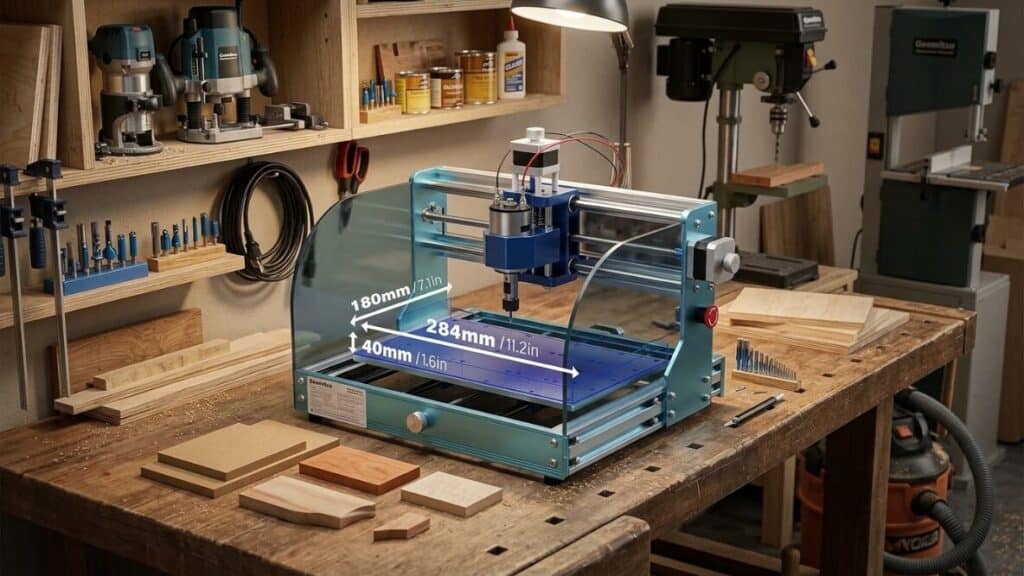
The Genmitsu 3018-PROVer V2 is the best entry-level CNC router under $400 for woodworking makers willing to climb a steep learning curve. After eight months of daily use, I’ve produced everything from custom wooden signs and PCB prototypes to aluminum brackets and acrylic enclosures. The all-metal frame, upgraded GRBL controller, and limit switches are genuine improvements over the original 3018 and cheap generic clones. But make no mistake: this is still a hobby machine. The 300×180×45mm work area is tiny, the spindle is underpowered for metals, and the out-of-box experience demands patience. If you’re a beginner with realistic expectations, a tinkerer’s mindset, and $350 to spend, the PROVer V2 is a smart buy. If you need production reliability or large work capacity, save for a Shapeoko or X-Carve. My rating: 3.5 out of 5 stars. Excellent value, significant limitations.
Table of Contents
Why I Bought the Genmitsu 3018-PROVer V2 (And What I Expected)
I’ve been woodworking for a decade and 3D printing for five years, but CNC routing always felt like the missing piece. I wanted to cut precise parts, engrave detailed signs, and prototype electronics enclosures without outsourcing. Full-size CNCs cost thousands and demand shop space I don’t have. The 3018 form factor—desktop-sized, affordable, expandable—seemed like the right entry point.
I researched extensively. The original Genmitsu 3018 had a reputation for being decent but flimsy, with plastic frames and frustrating assembly. The PROVer V2 promised upgrades: an all-aluminum frame, limit switches, an upgraded controller with offline capability, and better linear motion. At $349, it sat between dirt-cheap $200 clones and the $600+ next tier.
I bought it expecting a project in itself—something to assemble, calibrate, curse at, and eventually coax into producing usable parts. That’s exactly what I got.
Genmitsu 3018-PROVer V2 Specifications and Features
| Feature | Spec |
|---|---|
| Work Area | 300 × 180 × 45 mm (X × Y × Z) |
| Frame | All-aluminum extrusion |
| Linear Motion | T8 lead screws (X, Y), threaded rod (Z) |
| Stepper Motors | NEMA 17, 1.3A |
| Spindle | 775 DC motor, 10,000–24,000 RPM |
| Spindle Power | 120W (claimed), ~60W actual |
| Controller | GRBL 1.1f, ATmega328P |
| Connectivity | USB + offline controller (included) |
| Limit Switches | X, Y, Z (homing and soft limits) |
| Software | Candle (included), compatible with UGS, bCNC, Fusion 360 |
| Weight | 15 lbs (assembled) |
| Power Supply | 24V 5A |
| Price | ~$329–$379 |
Unboxing and Assembly: A Weekend Project, Not an Hour
The PROVer V2 arrives in a well-organized box with labeled bags, decent instructions, and all necessary tools. Assembly took me four hours spread across two evenings. The instructions are clearer than generic 3018 clones but still assume some mechanical aptitude. You’ll need patience, good lighting, and the ability to interpret ambiguous diagrams.
Key assembly observations:
- The aluminum extrusions are genuinely rigid compared to plastic-framed competitors. No flex when I push on the gantry.
- The limit switches require careful positioning. Mine needed adjustment to trigger reliably without being crushed.
- The spindle mount is aluminum, not plastic—a real upgrade that reduces runout.
- Wiring is manageable but cramped. The cable chains help organization but add drag.
My first power-on was anticlimactic. The steppers hummed, the spindle whined, and nothing moved correctly. I spent another evening calibrating steps per millimeter, checking motor current, and learning that GRBL’s $100–$132 parameters are not optional knowledge.
This is not a “plug and play” machine. Budget a weekend for assembly, calibration, and your first failed test cut.
Genmitsu 3018-PROVer V2 Performance Test: Materials, Speeds, and Reality
Wood and MDF: The Comfort Zone
The PROVer V2 handles wood and MDF confidently within its limits. My standard test: engraving a detailed logo into 1/4-inch Baltic birch plywood.
Settings that worked:
- Feed rate: 800 mm/min
- Plunge rate: 300 mm/min
- Depth per pass: 1 mm
- Spindle speed: 18,000 RPM
- Bit: 1/8-inch 2-flute carbide end mill
Results were clean and precise. The all-aluminum frame keeps deflection minimal, and the upgraded lead screws (T8 with anti-backlash nuts) produce surprisingly accurate repeatability. I consistently achieved ±0.1mm positional accuracy on wood projects.
Thicker stock (3/4-inch pine): Required multiple passes at conservative feeds. The 120W spindle bogs slightly on deep cuts, so I limited depth to 1.5mm per pass and accepted longer job times. Final results were good but not fast.
Hardwoods (walnut, maple): Demanded even more patience. Deep profiles in 1/2-inch walnut required 1mm passes at 600 mm/min. Burning occurred if I pushed faster. The spindle simply lacks torque for aggressive hardwood cutting.
Acrylic and Plastics: Better Than Expected
Acrylic machining was a pleasant surprise. With proper feeds and speeds, the PROVer V2 produces clean edges without melting.
Settings for 1/4-inch cast acrylic:
- Feed rate: 1,200 mm/min
- Plunge rate: 400 mm/min
- Depth per pass: 0.5 mm
- Spindle speed: 24,000 RPM (maximum)
- Bit: Single-flute upcut spiral
The high RPM and conservative depth prevented melting. Edge quality was good enough for functional enclosures, though not optically clear without flame polishing. I made several Arduino project boxes that fit together with satisfying precision.
Polycarbonate: More challenging. The spindle lacks power for aggressive cuts, and the material gums up bits. Stick to shallow passes and accept slow progress.
Aluminum: Possible, Painful, and Slow
This is where hobby CNC dreams meet reality. The PROVer V2 can cut aluminum, but it’s not happy about it.
Settings for 1/16-inch 6061 sheet:
- Feed rate: 200 mm/min
- Plunge rate: 100 mm/min
- Depth per pass: 0.1 mm
- Spindle speed: 24,000 RPM
- Bit: 1/8-inch 3-flute carbide, single-flute preferred
- Lubrication: WD-40 mist constantly
At these conservative settings, the PROVer V2 successfully machined simple brackets and adapter plates. But job times stretched to hours for small parts. The spindle heats up, the bit chatters if you push even slightly, and chip evacuation is poor.
I destroyed three end mills learning the hard way that this machine demands respect from aluminum. It’s capable of prototyping small parts, but production work is out of the question. For anything thicker than 1/8-inch aluminum, frustration outweighs utility.
PCB Milling: A Hidden Strength
Here’s where the PROVer V2 genuinely impressed me. PCB isolation milling—cutting copper traces on blank boards—is perfect for this machine’s capabilities.
Settings for FR4 copper clad:
- Feed rate: 300 mm/min
- Plunge rate: 100 mm/min
- Depth per pass: 0.05 mm
- Total depth: 0.1 mm (standard 1oz copper)
- Spindle speed: 24,000 RPM
- Bit: 10° or 20° V-bit, 0.1mm tip
Results were excellent. I produced functional double-sided PCBs with 0.5mm trace clearance, something that would cost $50+ from a fab house. The small work area is actually an advantage here—PCBs rarely exceed 100×150mm. I made custom breakout boards, sensor modules, and even a small motor driver that worked on the first try.
This capability alone justified the purchase for my electronics projects.
Spindle and Upgrades: The Weak Link
The stock 775 DC spindle is the PROVer V2’s biggest limitation. It’s rated at 120W but draws closer to 60W under load. The ER11 collet chuck is a genuine upgrade over original 3018 models, but runout is still noticeable—around 0.05mm in my measurements.
Problems with the stock spindle:
- Underpowered for metals: Bogs down on aggressive cuts, causes chatter
- Noise: High-pitched whine at 24,000 RPM is unpleasant for long jobs
- Heat: Gets hot during extended runs, requiring cool-down breaks
- Runout: Causes slightly rougher finishes and faster bit wear
Popular upgrades I tested:
- 500W brushless spindle ($80–$120): Transformed the machine. More power, less noise, better runout. Highly recommended if you plan serious work.
- Laser module ($50–$150): The PROVer V2’s frame handles diode lasers well. I tested a 5.5W module for engraving and cutting thin materials. Fun addition, not essential.
- 4th axis rotary ($80–$120): The controller supports it, but the work area is too small for meaningful cylindrical projects. Skip unless you have a specific need.
If you buy the PROVer V2, budget for a spindle upgrade within six months. It’s the single biggest improvement you can make.
Controller and Software: GRBL Reality
The upgraded controller runs GRBL 1.1f on an ATmega328P. It supports:
- USB connection to PC (Candle, UGS, bCNC)
- Offline controller for running jobs without a computer
- Limit switches for homing and soft limits
- Spindle speed control via PWM
Candle (included software): Functional but basic. Good for beginners, limiting for advanced users. I outgrew it within weeks.
Universal G-Code Sender (UGS): My daily driver. Stable, feature-rich, and free. The platform version works well for visualization.
bCNC: Excellent for advanced users. Built-in autoleveling for PCB milling, which is essential for compensating bed irregularities.
Fusion 360: The gold standard for CAD/CAM. The personal use license is free and powerful. Learning curve is steep but worth it.
The offline controller is genuinely useful for simple jobs. Load the G-code onto an SD card, jog to position, and run. No tethered computer needed. But it lacks preview and editing capabilities, so I use it mainly for repeat jobs I’ve already proven.
GRBL parameter tuning is mandatory. Out of the box, my machine lost steps on rapid moves. I had to reduce $110–$112 (max rate) and $120–$122 (acceleration) from default values. This isn’t optional—it’s required for reliable operation.
Work Area and Bed: Tiny but Usable
300×180×45mm sounds small, and it is. I’ve made:
- Custom wooden signs up to 11 inches long (by flipping or tiling)
- Electronics enclosures around 100×80mm
- PCB prototypes up to 150×100mm
- Small aluminum brackets and adapters
- Jewelry and keychain designs
The bed is aluminum extrusion with T-slot channels, making workholding flexible. I use:
- Double-sided tape for flat sheet materials
- Clamps for thicker stock (risk of bit collision)
- Vacuum hold-down (DIY solution with a shop vac and spoilboard)
- Vise for small metal parts
The Z height (45mm) is more limiting than it appears. With a spoilboard and bit stick-out, effective cutting depth is closer to 30mm. For 3D carving and thick stock, this is restrictive.
Genmitsu 3018-PROVer V2 Pros and Cons
✅ What I Liked
- All-aluminum frame is genuinely rigid for the price point
- Limit switches enable homing and prevent crashes
- Offline controller allows untethered operation
- ER11 collet accepts standard 1/8-inch shank bits
- T8 lead screws with anti-backlash nuts improve accuracy
- PCB milling capability is excellent for electronics hobbyists
- Active community provides mods, tutorials, and troubleshooting help
- Expandable with lasers, 4th axis, and spindle upgrades
- Cable chains keep wiring organized
- Price is fair for what you receive
❌ What I Didn’t Like
- Tiny work area limits project scope significantly
- Underpowered spindle struggles with metals and hardwoods
- Steep learning curve demands GRBL knowledge and patience
- Stock software (Candle) is too basic for serious work
- Spindle runout affects finish quality and bit life
- No enclosure means chips and noise everywhere
- Bed leveling requires frequent attention for precision work
- Z-axis threaded rod is slower and less precise than ball screw
- Customer support is slow and often unhelpful
- Not truly “plug and play” despite marketing suggestions
Genmitsu 3018-PROVer V2 vs. Competitors
vs. Original Genmitsu 3018 / Generic 3018 Clones
The PROVer V2 is worth the $100+ premium. The aluminum frame, limit switches, and upgraded controller transform reliability. Generic clones with plastic frames flex visibly and lack homing capability. For first-time buyers, the PROVer V2 is the better investment.
Winner: PROVer V2
vs. Genmitsu 3020-PRO / 3040-PRO
These larger Genmitsu models offer more work area and sometimes better spindles. If you can stretch to $500–$700, the 3020-PRO is a meaningful upgrade. But the PROVer V2’s PCB milling strength and compact size suit many users.
Winner: Depends on work area needs
vs. Shapeoko 4 / X-Carve
These $1,500+ machines are in a different category. Larger work areas, more powerful spindles, professional support, and production capability. If you’re starting a business or need reliability, save for these. The PROVer V2 is a learning tool, not a production machine.
Winner: Shapeoko/X-Carve (for professionals); PROVer V2 (for hobbyists on budget)
vs. Snapmaker 2.0
The Snapmaker is a 3-in-1 (3D printer, laser, CNC) at $1,000+. Its CNC function is comparable to the PROVer V2 but with larger work area. If you need all three functions, the Snapmaker makes sense. If you only need CNC, the PROVer V2 is better value.
Winner: PROVer V2 (for CNC-only users)
Who Should Buy the Genmitsu 3018-PROVer V2?
Buy the PROVer V2 if:
- You’re a maker or hobbyist wanting to learn CNC fundamentals
- You need PCB prototyping capability for electronics projects
- You work primarily with wood, plastics, and soft materials
- You have patience for tinkering, calibration, and learning
- Your budget is under $400 and shop space is limited
- You want a modular platform to upgrade over time
- You enjoy the journey of learning as much as the finished parts
Skip the PROVer V2 if:
- You need production reliability or run a business
- Your projects regularly exceed 300×180mm
- You want to machine steel, titanium, or thick aluminum
- You expect plug-and-play simplicity like a 3D printer
- You lack time for troubleshooting and calibration
- You can save $1,000+ for a Shapeoko or equivalent
- You need professional support and warranty service
Essential Upgrades and Accessories
If you buy the PROVer V2, budget an extra $100–$200 for:
- 500W brushless spindle: The single best upgrade. More power, less noise, better results.
- End mill assortment: 1/8-inch 2-flute carbide for general use, single-flute for aluminum, V-bits for engraving, PCB bits for electronics.
- Spoilboard and hold-down system: Essential for workholding. I built a custom MDF spoilboard with threaded inserts.
- Dust collection: A small shop vac hose positioned near the spindle helps enormously.
- Safety glasses and hearing protection: The spindle is loud, and chips fly unpredictably.
- Digital caliper: For verifying dimensions and calibrating steps-per-mm.
Long-Term Durability: 8-Month Report
Eight months of moderate-to-heavy use revealed expected wear:
- Lead screws developed slight backlash despite anti-backlash nuts. Periodic adjustment helps.
- V-wheels on the gantry showed wear and needed tightening twice.
- Spindle bearings became noisier. The upgrade to brushless solved this.
- Controller remained reliable with no electronic failures.
- Frame is still rigid with no measurable flex.
With maintenance—cleaning, lubrication, and periodic tightening—the PROVer V2 should last several years of hobby use. It’s not built for industrial duty, but it’s not disposable either.
Final Thoughts: The CNC Gateway Drug
The Genmitsu 3018-PROVer V2 is exactly what I expected and needed: an affordable, capable, frustrating, educational introduction to CNC machining. It taught me feeds and speeds, workholding, G-code, and the reality that “CNC” doesn’t mean “effortless perfection.”
I’ve made genuinely useful things with this machine. Custom parts that fit my projects perfectly. PCB prototypes that worked on the first try. Gifts that impressed recipients who didn’t know they were made on a $350 desktop toy. The satisfaction of designing something in CAD and holding the physical result hours later never gets old.
But I’ve also ruined stock, broken bits, crashed the spindle into the bed, and spent evenings troubleshooting mysterious lost steps. This machine demands your engagement. It will not reward casual use.
If you approach the PROVer V2 with realistic expectations—a learning platform, not a production tool—you’ll find genuine value. If you expect ShopBot performance at 1/10th the price, you’ll be disappointed and angry.
For me, the PROVer V2 served its purpose. I’m now saving for a Shapeoko 4 because this machine proved that CNC belongs in my workflow. That’s the highest praise I can offer: it created demand for something better.
Genmitsu 3018-PROVer V2 Review Score
| Category | Rating |
|---|---|
| Value for Money | ⭐⭐⭐⭐ |
| Build Quality | ⭐⭐⭐⭐ |
| Work Area | ⭐⭐ |
| Spindle Performance | ⭐⭐ |
| Ease of Setup | ⭐⭐ |
| Software Ecosystem | ⭐⭐⭐⭐ |
| Accuracy (Wood/Plastic) | ⭐⭐⭐⭐ |
| Accuracy (Metal) | ⭐⭐ |
| Upgrade Path | ⭐⭐⭐⭐⭐ |
| Long-Term Durability | ⭐⭐⭐ |
| Overall Enjoyment | ⭐⭐⭐⭐ |
Overall Rating: ⭐⭐⭐½ (3.5/5)
Would I buy the Genmitsu 3018-PROVer V2 again? Absolutely. It was the right machine at the right price for the right stage of my CNC journey. Would I recommend it to a friend? Only with a long conversation about expectations, patience, and the reality that this is a hobby machine that punches slightly above its weight.
Have you taken the 3018 plunge? Did you stick with it or upgrade quickly? I’d love to hear your CNC journey in the comments.
