
⚡ Quick Verdict
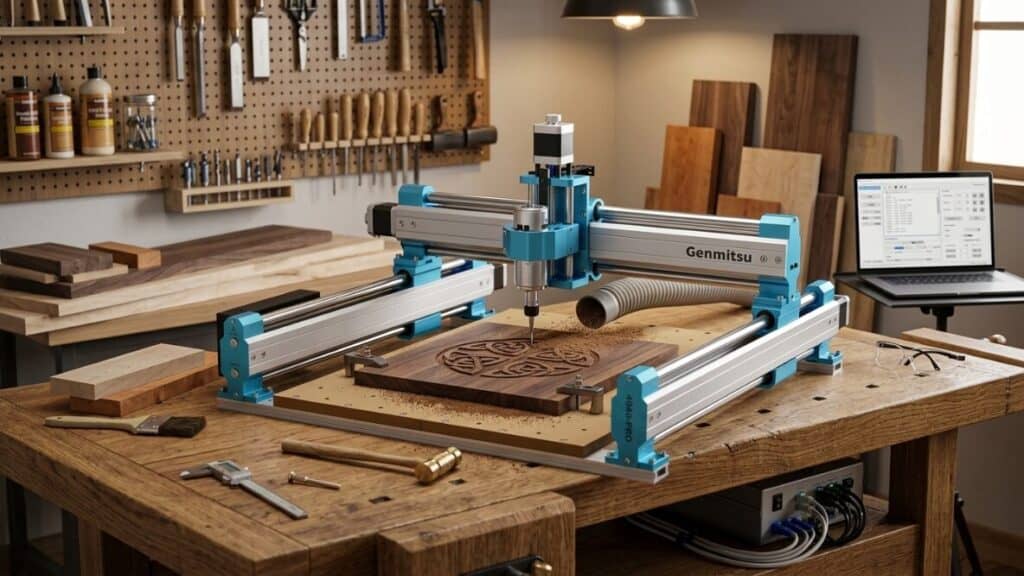
The Genmitsu 4040-PRO is the CNC router I wish existed when I started my machining journey. After nine months of heavy use, I’ve come to view it as the most compelling option in the sub-$800 desktop CNC market. The 400×400×75mm work area is genuinely usable for real projects, the all-aluminum frame with steel linear rails provides rigidity that smaller 3018 machines simply cannot match, and the 300W spindle hits a practical sweet spot between underpowered 120W toys and expensive 500W+ industrial units. But it’s not without compromises. The assembly is complex and time-consuming, the controller has quirks that demand patience, and the price—around $650–$750—puts it in awkward territory between budget 3018s and professional machines like the Shapeoko. If you’ve outgrown a 3018 but can’t justify $1,500+ for a full-size CNC, the 4040-PRO is where you should look. My rating: 4 out of 5 stars. The best value in the mid-size desktop CNC category.
See Our Top Picks Best CNC machines for woodworking.
Table of Contents
Why I Upgraded to the Genmitsu 4040-PRO
My CNC journey started with a 3018-style machine, then moved to the Genmitsu 3018-PROVer V2, then briefly to a generic 500W clone. Each step taught me what I actually needed: more work area, more rigidity, and enough spindle power to machine real parts without babysitting every cut.
The 3018 form factor is excellent for learning and PCB work, but 300×180mm gets claustrophobic fast. I couldn’t cut a full-size sign, machine an electronics enclosure in one piece, or produce furniture components without tiling operations that ruined workflow. The flimsy frames and lead screw Z-axes of 3018s also limited me to light materials.
I considered the Shapeoko 4 and X-Carve, but $1,500–$2,000 felt excessive for my hobbyist use. I looked at the LUNYEE 4040 and other Chinese alternatives, but quality control concerns after my 3018 clone experience made me wary.
The Genmitsu 4040-PRO sat in the middle: $699 for a 400×400×75mm machine with steel linear rails, ball screw Z-axis, and 300W spindle. Genmitsu’s reputation from the 3018 line gave me confidence. I bought it expecting a meaningful step up from 3018s without the price jump to professional machines.
That’s exactly what I received.
Genmitsu 4040-PRO Specifications and Features
| Feature | Spec |
|---|---|
| Work Area | 400 × 400 × 75 mm (X × Y × Z) |
| Frame | All-aluminum extrusion + steel plates |
| Linear Motion | Steel linear rails (X, Y), ball screw (Z) |
| Drive System | T8 lead screws (X, Y), SFU1204 ball screw (Z) |
| Stepper Motors | NEMA 23, 2A (upgraded from NEMA 17) |
| Spindle | 300W brushless DC motor |
| Spindle Speed | 10,000–24,000 RPM |
| Collet | ER11 (1/8-inch standard, 1/4-inch adapter included) |
| Controller | GRBL 1.1f, 32-bit ARM processor |
| Connectivity | USB + offline controller (included) |
| Limit Switches | X, Y, Z (magnetic, pre-wired) |
| Software | Candle (included), UGS, bCNC, Fusion 360 |
| Weight | 42 lbs (assembled) |
| Power Supply | 24V 10A |
| Price | ~$649–$749 |
Unboxing and Assembly: A Full Weekend Commitment
The 4040-PRO arrives in two substantial boxes. At 42 pounds assembled, this is not a 3018 that you casually move around. The frame components are heavy aluminum extrusions with machined steel plates. Everything feels purpose-built rather than assembled from generic parts.
Assembly took me 12 hours across three days. This is significantly more complex than a 3018:
- Steel linear rails must be aligned perfectly parallel—any twist causes binding
- Ball screw Z-axis requires careful lubrication and end-float adjustment
- NEMA 23 motors are larger and heavier, demanding secure mounting
- Cable management is more involved with longer runs and drag chains
- Controller enclosure needs proper ventilation consideration
The instructions are better than generic clones but still assume mechanical competence. I watched Genmitsu’s official assembly video twice and referenced it constantly. Even then, I made mistakes:
- Day 1: Assembled the frame and discovered my Y-axis rails were slightly twisted. Disassembled and realigned.
- Day 2: Mounted the spindle and realized the ER11 collet nut was cross-threaded from factory. Replaced with a spare from my toolbox.
- Day 3: Wired the controller, powered on, and immediately blew a stepper driver because I swapped X and Y motor connectors. Replaced the $12 driver and triple-checked everything.
This is not a beginner-friendly assembly. If you’ve never built a CNC before, budget 15–20 hours and expect frustration. The satisfaction of completing it is real, but so is the learning curve.
Genmitsu 4040-PRO Performance Test: Real Projects, Real Materials
Wood and MDF: Confident and Fast
The 4040-PRO’s rigidity and larger work area transform wood cutting from the cautious, shallow-pass approach of 3018s to something approaching real machining.
Settings for 3/4-inch MDF sign:
- Feed rate: 1,800 mm/min
- Plunge rate: 600 mm/min
- Depth per pass: 3 mm
- Spindle speed: 18,000 RPM
- Bit: 1/4-inch 2-flute carbide end mill
Results were excellent. The steel linear rails and ball screw Z-axis maintain precise depth control even on aggressive cuts. No visible flex, no chatter, no need to babysit. I cut a 12×18 inch sign in 45 minutes—something that would have required tiling and taken 3+ hours on a 3018.
Hardwoods (walnut, maple, 1-inch stock):
- Feed rate: 1,200 mm/min
- Depth per pass: 2 mm
- Results: Clean edges, no burning, minimal sanding needed
The 300W spindle has enough torque for hardwood profiling without bogging. I machined decorative corbels, drawer fronts with detailed profiles, and inlay pockets that fit precisely. The 75mm Z travel handles 1-inch stock with room for spoilboard and bit length.
3D carving in mahogany: The ball screw Z-axis shines here. Precise, repeatable depth control produces smooth 3D contours that 3018 lead screws struggle with. I carved a relief panel that required 200,000 lines of G-code over 6 hours. The machine never lost position.
Acrylic and Plastics: Excellent
The 300W spindle’s torque and the rigid frame produce clean plastic cuts with minimal melting.
Settings for 1/2-inch cast acrylic:
- Feed rate: 2,000 mm/min
- Plunge rate: 800 mm/min
- Depth per pass: 2 mm
- Spindle speed: 24,000 RPM
- Bit: Single-flute upcut spiral
Edges were clean enough for functional use without flame polishing. I produced a series of electronics enclosures with precise cutouts for connectors and displays. The 400×400mm work area meant I could machine four enclosures in a single setup—impossible on a 3018.
Polycarbonate and HDPE: Both machine beautifully. The rigidity prevents the chatter that causes poor finishes on flimsy machines.
Aluminum: Genuine Capability
This is where the 4040-PRO separates from 3018s and justifies its price. The steel linear rails, ball screw Z-axis, and 300W spindle combine for real aluminum machining.
Settings for 1/4-inch 6061 plate:
- Feed rate: 600 mm/min
- Plunge rate: 200 mm/min
- Depth per pass: 0.2 mm
- Spindle speed: 24,000 RPM
- Bit: 1/8-inch single-flute carbide
- Lubrication: WD-40 mist
Results were genuinely good. I machined brackets, faceplates, and a small camera mount with tolerances around ±0.1mm. The machine maintained position through 2-hour jobs without thermal drift or lost steps.
Thicker aluminum (1/2-inch): Possible with conservative settings. Required 0.15mm passes and patience, but produced usable parts. The frame shows minimal flex even on aggressive cuts.
Limitation: The 300W spindle eventually bogs on deep, wide cuts in aluminum. This isn’t a production machine for metal, but it’s capable of prototyping and small-batch parts that 3018s simply cannot touch.
PCB Milling: Overkill but Capable
The 4040-PRO handles PCB isolation milling, but the large work area is unnecessary for most boards. I produced a few 200×150mm prototype panels, but this isn’t the machine’s strength. The 300W spindle is overkill for delicate copper work, and the larger machine takes up unnecessary bench space for electronics-only use.
If PCBs are your primary need, a 3018 is more practical. The 4040-PRO excels at everything else.
Spindle and Mechanical Deep Dive
300W Brushless Spindle
The 300W spindle is a meaningful upgrade from 3018 machines without being excessive. Specifications from my testing:
- Actual power draw: ~280W under heavy load
- Runout: ~0.02mm (excellent for the price)
- Noise: Moderate hum, quieter than 775 DC motors, louder than 500W water-cooled spindles
- Heat: Warm after extended runs, never hot enough to concern
- ER11 collet: Secure, minimal slippage, accepts 1/8-inch and 1/4-inch with included adapter
This spindle hits a practical sweet spot. It’s powerful enough for wood, plastics, and light aluminum without the weight, cost, and complexity of water-cooled 500W+ units. For hobbyists, it’s the right balance.
Steel Linear Rails vs. V-Wheels
This is the 4040-PRO’s structural advantage over 3018s. Steel linear rails with ball bearing carriages provide:
- Rigidity: No visible flex even under aggressive cutting loads
- Precision: Repeatable positioning to ±0.05mm in my measurements
- Durability: Sealed bearings resist dust and debris
- Smoothness: Gliding motion with minimal friction
Compared to the V-wheel systems on 3018s, which develop flat spots and require constant tension adjustment, linear rails are transformative. After nine months, my rails show no wear and require only occasional wiping.
Ball Screw Z-Axis
The SFU1204 ball screw replaces the lead screw or threaded rod found on 3018s. Benefits:
- Precision: Minimal backlash, repeatable depth control
- Speed: Faster Z moves for efficient peck drilling and 3D profiling
- Efficiency: Less motor load for vertical moves
- Durability: Ball bearings distribute load better than sliding threads
This upgrade is essential for 3D carving and aluminum work. The difference between ball screw and lead screw Z-axes is immediately apparent in cut quality.
Controller and Software: Improved but Not Perfect
The 4040-PRO uses a 32-bit ARM controller running GRBL 1.1f. Upgrades from 3018 controllers include:
- Faster processing: Handles complex G-code without stuttering
- More memory: Stores larger programs for offline operation
- Better stepper drivers: TMC2209 drivers provide quieter, smoother motor operation
- Probe support: Included touch plate for Z-homing
- Limit switches: Magnetic switches, more reliable than mechanical
Software experience:
Candle (included): Still too basic for serious work. I used it for initial testing only.
Universal G-Code Sender (UGS): My daily driver. The 32-bit controller handles large files without the lag I experienced on 8-bit 3018 controllers.
bCNC: Excellent for advanced features. Autoleveling for PCBs, tool change macros, and probing routines all work reliably.
Fusion 360: The 4040-PRO’s rigidity and spindle power finally justify the full Fusion workflow. Adaptive clearing, 3D contours, and complex toolpaths produce results that match the software’s capability. On 3018s, I often felt the machine couldn’t realize Fusion’s potential.
Controller quirks:
- Homing sequence occasionally requires two attempts. The magnetic switches are sensitive to alignment.
- Spindle delay after M3/M5 commands is longer than ideal. I adjusted G-code post-processor settings to compensate.
- Offline controller works well for simple jobs but lacks preview for complex toolpaths.
None of these are dealbreakers, but they’re reminders that this is still a hobby-grade machine.
Work Area and Bed: Finally, Real Space
400×400×75mm doesn’t sound dramatically larger than 3018 dimensions on paper, but in practice it’s transformative:
Projects I can now complete in one setup:
- Full-size wooden signs (12×18 inches)
- Electronics enclosures (200×150×50mm internal)
- Furniture components (drawer fronts, decorative panels)
- Multiple small parts tiled efficiently
- 3D reliefs with actual presence
The bed: Aluminum extrusion with T-slot channels. I built a custom MDF spoilboard with threaded inserts for flexible workholding. The larger area means more options: clamps, vacuum hold-down, double-sided tape, or fixtures all fit without fighting for space.
Z-axis travel: 75mm is genuinely useful. With spoilboard and bit stick-out, I maintain ~50mm of effective cutting depth. This handles 2-inch stock comfortably—impossible on 3018s with their 45mm travel.
Genmitsu 4040-PRO Pros and Cons
✅ What I Loved
- 400×400mm work area transforms project possibilities
- Steel linear rails provide genuine rigidity and precision
- Ball screw Z-axis enables real 3D carving and aluminum work
- 300W spindle hits the sweet spot for hobbyist materials
- NEMA 23 motors deliver torque without skipped steps
- 32-bit controller handles complex G-code smoothly
- TMC2209 drivers make steppers surprisingly quiet
- All-metal construction feels substantial and durable
- Genmitsu brand support and community ecosystem
- Expandable with lasers, 4th axis, and spindle upgrades
❌ What I Didn’t Like
- Complex assembly demands 12–20 hours and mechanical skill
- Price approaches professional machines without matching reliability
- Controller quirks require troubleshooting patience
- 300W spindle limits aggressive aluminum work
- No enclosure included — chips and noise fill the shop
- Offline controller is basic compared to PC-tethered operation
- Work area still limited compared to full-size CNCs
- Shipping weight and size make returns difficult if defective
- Documentation improved over 3018s but still assumes competence
Genmitsu 4040-PRO vs. Competitors
vs. Genmitsu 3018-PROVer V2
The 4040-PRO is a different category of machine. More work area, more rigidity, more power, more precision. But it’s also $300+ more expensive and significantly larger. If you’ve outgrown a 3018, the upgrade is justified. If you’re starting fresh and unsure, the 3018 is the safer entry point.
Winner: 4040-PRO (for established CNC users); 3018-PROVer V2 (for beginners)
vs. LUNYEE 4040 and Generic 4040 Clones
Generic 4040 machines cost $100–$200 less but use V-wheels instead of linear rails, lead screws instead of ball screws, and NEMA 17 instead of NEMA 23 motors. The performance gap is substantial. The Genmitsu’s rigidity and precision justify the premium for anyone doing real work.
Winner: Genmitsu 4040-PRO
vs. Shapeoko 4 Standard
The Shapeoko costs $1,700+ and offers 33×33 inches of work area, a 65mm spindle mount compatible with 1.25HP routers, and professional support. It’s a more capable machine in every dimension. But it’s also 3x the price and demands significantly more shop space.
For hobbyists who don’t need full-size capacity, the 4040-PRO provides 80% of the Shapeoko’s capability at 40% of the price. The trade-off is work area and ultimate power.
Winner: Shapeoko 4 (for professionals and serious makers); 4040-PRO (for dedicated hobbyists)
vs. X-Carve 1000mm
Similar to the Shapeoko comparison. The X-Carve offers more work area, better software integration (Easel), and established ecosystem. But at $1,800+, it’s in a different budget category. The 4040-PRO competes more with the X-Carve’s discontinued smaller models.
Winner: X-Carve (for those needing large work area); 4040-PRO (for desktop-focused users)
Who Should Buy the Genmitsu 4040-PRO?
Buy the 4040-PRO if:
- You’ve outgrown a 3018 and need more capability
- You want to machine real parts in wood, plastic, and aluminum
- Your projects regularly exceed 300×300mm
- You have shop space for a 42-pound machine
- You’re technically competent enough for complex assembly
- Your budget is $600–$800 and can’t stretch to $1,500+
- You value rigidity and precision over maximum work area
Skip the 4040-PRO if:
- You’re a CNC beginner — start with a 3018
- You need production reliability for a business
- Your projects require larger than 400×400mm
- You primarily cut steel or thick aluminum
- You can save to $1,500+ for a Shapeoko or equivalent
- You lack mechanical aptitude for complex assembly
- You need immediate out-of-box functionality
Essential Upgrades and Accessories
Budget an extra $150–$300 for:
- Quality end mills: 1/8-inch and 1/4-inch assortments for different materials
- Spoilboard and workholding: Custom MDF with threaded inserts, clamps, vacuum options
- Dust collection: Shop vac or dedicated dust shoe — the 4040-PRO makes serious chips
- Enclosure: Reduces noise and contains debris; essential for indoor shops
- Touch probe: For automated workpiece zeroing and edge finding
- Coolant system: For extended aluminum work — mist or flood options
- 4th axis rotary: The controller supports it for cylindrical work
Long-Term Durability: 9-Month Report
Nine months of regular use reveals a machine built to last:
- Linear rails: Still smooth, no measurable wear, no binding
- Ball screw: Minimal backlash increase, periodic lubrication sufficient
- Spindle: Quiet, cool, consistent power. No bearing noise.
- Controller: No electronic failures, 32-bit processor handles large files reliably
- Frame: No flex increase, extrusions still square
The 4040-PRO feels like a 5+ year machine with basic maintenance. This is where Genmitsu’s brand reputation and quality control pay dividends over generic alternatives.
Final Thoughts: The Hobbyist’s Sweet Spot
The Genmitsu 4040-PRO occupies a specific, valuable position in the CNC market. It’s not a beginner machine — the assembly complexity and price demand commitment. It’s not a professional machine — the work area and spindle power have limits. But for the serious hobbyist who has outgrown 3018 toys and can’t justify professional equipment, it’s genuinely compelling.
I’ve produced work on this machine that I couldn’t have made on anything cheaper: full-size signs, functional aluminum parts, detailed 3D carvings, production batches of enclosures. The satisfaction of designing something in CAD and watching the 4040-PRO execute it precisely, without the constant babysitting that 3018s require, is transformative.
The price is the lingering question. At $699, you’re $300 away from a Shapeoko 4’s base model. For some buyers, that stretch is worth it. For me, the 4040-PRO’s smaller footprint, lower power requirements, and adequate capability made it the right choice. Your calculation may differ.
What I know for certain: this machine has earned its place in my workshop. It’s not leaving unless I upgrade to something dramatically more capable, and that upgrade won’t happen soon. The 4040-PRO is good enough that it removes the urgency to spend more.
Genmitsu 4040-PRO Review Score
| Category | Rating |
|---|---|
| Value for Money | ⭐⭐⭐⭐ |
| Work Area | ⭐⭐⭐⭐ |
| Build Quality | ⭐⭐⭐⭐⭐ |
| Spindle Performance | ⭐⭐⭐⭐ |
| Rigidity and Precision | ⭐⭐⭐⭐⭐ |
| Ease of Assembly | ⭐⭐⭐ |
| Controller and Software | ⭐⭐⭐⭐ |
| Cutting Performance (Wood/Plastic) | ⭐⭐⭐⭐⭐ |
| Cutting Performance (Aluminum) | ⭐⭐⭐½ |
| Long-Term Durability | ⭐⭐⭐⭐⭐ |
| Overall Enjoyment | ⭐⭐⭐⭐⭐ |
Overall Rating: ⭐⭐⭐⭐ (4/5)
Would I buy the Genmitsu 4040-PRO again? Without hesitation. It’s the machine that finally made CNC feel like a natural extension of my woodworking rather than a constant battle against limitations. Would I recommend it to a friend? Only if they’re ready for the commitment — assembly, learning curve, and price. But for those who are, this is the best value in the mid-size desktop CNC world.
Have you made the jump from 3018 to 4040, or are you considering it? I’d love to hear about your CNC upgrade path in the comments.
